You post a reel on Instagram. It gets 10,000 views and 200 comments. People are clearly interested.
But here's what happens next for most businesses: those 200 comments turn into maybe 5 actual sales. The other 195 people? They commented, scrolled away, and forgot about you.
Meanwhile, smart businesses are converting 40-50% of those commenters into actual leads by automatically moving them from Instagram to WhatsApp.
Let me show you the exact automation workflow that turns Instagram engagement into WhatsApp leads and WhatsApp leads into paying customers.
Why Moving From Instagram to WhatsApp Changes Everything
Instagram is great for discovery. People scroll, they see your content, they engage. But Instagram is terrible for conversion.
Here's why:
Instagram Is Noisy and Distracting
Someone comments on your reel. Great. But two seconds later, they're scrolling to the next reel, then the next, then the next.
Your content is competing with endless distractions. Even if they were genuinely interested, they'll forget about you within minutes.
Instagram DMs Get Buried
Even if someone DMs you on Instagram, that conversation gets lost in their message requests or drowns in a sea of other DMs.
People check Instagram for entertainment, not for important conversations.
WhatsApp Is Where Decisions Happen
WhatsApp is where people have real conversations. It's where they talk to friends, family, and yes, businesses they're seriously considering buying from.
When you move someone from Instagram to WhatsApp, you're moving them from browsing mode to buying mode.
You Don't Own Your Instagram Audience
Instagram owns your followers. If your account gets hacked, banned, or the algorithm changes, you lose access to everyone.
But when you capture someone's WhatsApp number, you own that contact. You can reach them anytime, regardless of what happens on Instagram.
The Complete Instagram to WhatsApp Automation Workflow
Let me break down the exact process successful businesses use.
Step 1: Create Instagram Content with a Clear Hook
This is where it starts. Your Instagram reel or post needs to get people to take action.
What Works for Engagement
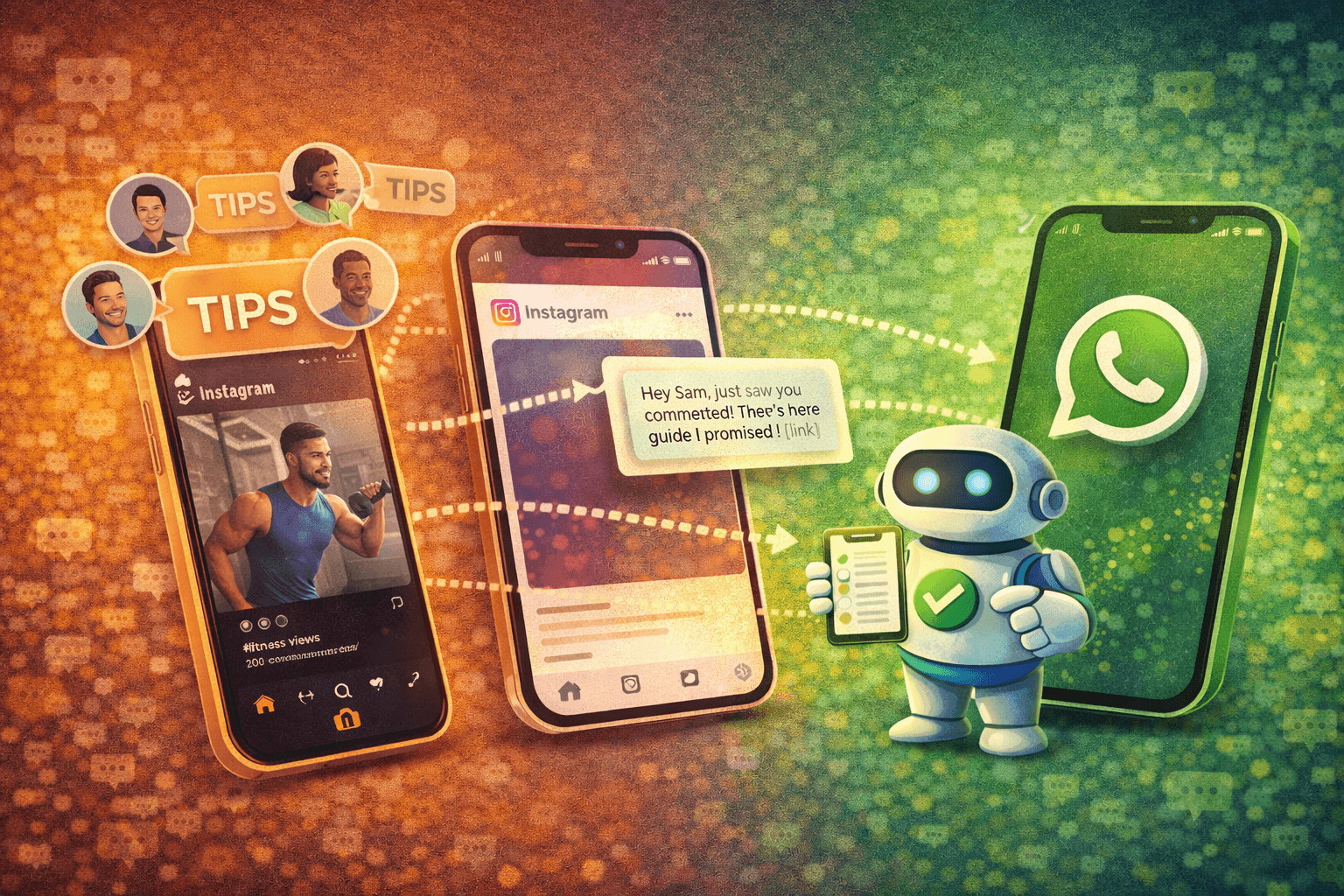
Educational content: "5 mistakes killing your [result]. Comment TIPS to get the full guide."
Before/after transformations: "This is how I went from X to Y. Comment STORY for the details."
Product reveals: "New launch coming Friday. Comment FIRST for early access."
Challenges or quizzes: "Can you guess what this is? Comment your answer and I'll DM you if you're right."
The pattern is simple: show something valuable, ask for a specific comment to get more.
The Trigger Word Is Key
Don't just say "comment below." Give them a specific word to comment:
- TIPS
- GUIDE
- LINK
- YES
- INTERESTED
This specific trigger word is what activates your automation. More on that in a second.
Step 2: Comment-to-DM Automation Kicks In
When someone comments with your trigger word, automation immediately sends them an Instagram DM.
How Instagram DM Automation Works
You set up rules in your automation platform:
- If someone comments "TIPS" → send Instagram DM sequence A
- If someone comments "GUIDE" → send Instagram DM sequence B
- If someone comments "LINK" → send Instagram DM sequence C
The automation detects the keyword and instantly (within seconds) sends a personalized DM.
What That First Instagram DM Should Say
Example: "Hey [Name]! Just saw you commented on my reel. Here's that guide I promised: [value]. Quick question while I have you: are you dealing with [problem A] or [problem B]?"
You're delivering what you promised AND starting a conversation AND qualifying them.
Step 3: Move Them to WhatsApp
This is the critical transition. You don't want to keep the entire conversation on Instagram. You want to move them to WhatsApp where conversion rates are higher.
How to Make the Transition Natural
After a message or two in Instagram DMs, automation suggests moving to WhatsApp:
Example: "I can give you way better personalized help over WhatsApp. It's easier to send you examples and answer your specific questions there. Here's my WhatsApp link: [link]. Just shoot me a message saying HI and I'll know it's you."
Or even simpler: "This is getting into detailed territory. Can we continue on WhatsApp? Way easier to send you screenshots and resources there. Click here: [WhatsApp link]"
The WhatsApp Link
Your WhatsApp link looks like this: wa.me/919876543210?text=Hi%20from%20Instagram
When they click it, WhatsApp opens automatically with a pre-filled message. They just hit send.
The pre-filled message ("Hi from Instagram") helps you track where this lead came from.
Step 4: WhatsApp Automation Takes Over
Once they message you on WhatsApp, a new automation sequence begins.
Welcome and Context Setting
Automated WhatsApp message: "Hey! Great to connect here. Just to make sure I'm giving you the right info: you saw my Instagram reel about [topic], right? What specifically interested you about it?"
This confirms context and gets them talking about their needs.
Qualification Questions
Based on their response, automation asks qualifying questions:
- "What's your current situation with [problem]?"
- "Have you tried solving this before?"
- "What's your timeline for fixing this?"
- "What's your budget range?"
Each answer helps you understand if they're a good fit and how ready they are to buy.
Personalized Response Paths
Good automation branches based on answers:
If they say "Just browsing": Add to nurture sequence, send weekly value If they say "Need this ASAP": Route to sales team immediately If they say "Interested but not sure": Send case studies, testimonials, and follow up in 3 days
The conversation adapts to each person.
Step 5: Convert on WhatsApp
Now you're in WhatsApp where serious buying conversations happen.
How the Sales Process Works
For product businesses:
- Show product details, sizes, colors
- Answer questions about shipping, returns, quality
- Send payment link
- Process order
- Send order confirmation and tracking
For service businesses:
- Share more about your service
- Provide case studies or examples
- Offer discovery call or consultation
- Send booking link
- Confirm appointment
- Send prep materials
All of this can be partially or fully automated depending on complexity.
The Power of WhatsApp for Closing
People are way more comfortable buying through WhatsApp than through Instagram. Why?
- It feels more personal and trustworthy
- They can ask questions in real-time
- Payment through WhatsApp feels safer
- They can refer back to the conversation easily
- No algorithm hiding your messages
Real Example: Fitness Coach Converts Instagram Views to Paying Clients
Let me show you how this works in the real world.
Rohan is a fitness coach in Pune. He posts workout reels on Instagram.
His Old Process (Manual)
- Post workout reel
- Get 50-100 comments saying "Great tips!"
- Manually reply to maybe 20 of them in his free time
- 2-3 people DM him asking about his coaching
- He responds hours later (because he's busy training clients)
- Half of them have lost interest by then
- Converts 1 person per week into a paying client
His New Process (Automated Instagram to WhatsApp)
- Post workout reel with "Comment PLAN for my complete training program"
- 80 people comment "PLAN"
- Automation instantly DMs all 80 on Instagram: "Hey! Here's an overview of my program: [link]. Most people struggle with consistency or don't know proper form. Which one is your bigger challenge?"
- 50 people respond
- Automation qualifies them and asks: "Want to discuss a personalized plan? I can help you way better over WhatsApp. Click here: [link]"
- 25 people move to WhatsApp
- WhatsApp automation asks about their goals, fitness level, and availability
- 12 people are qualified and interested
- Automation books discovery calls for them
- Rohan does 12 discovery calls that week
- Converts 5-6 into paying clients
Same content. Same effort creating reels. 5-6x more clients.
The Technical Setup: How to Build This Workflow
You don't need to be technical, but you do need the right tools.
What You Need
Instagram Business Account: Required to connect to automation tools
Automation Platform: Software that connects Instagram and WhatsApp and builds the workflows. Platforms like Wasupp handle this.
WhatsApp Business API: Not the free WhatsApp Business app. You need API access for automation.
WhatsApp Number: A dedicated business number (don't use your personal number)
Building the Workflow Step-by-Step
Step 1: Connect Your Instagram Account Link your Instagram Business account to your automation platform. This gives permission to detect comments and send DMs.
Step 2: Set Up Comment Triggers Create rules:
- Trigger word: "TIPS"
- Action: Send Instagram DM sequence #1
Step 3: Build Instagram DM Sequence Write the messages that go out when someone comments:
- Message 1: Deliver value + ask qualifying question
- Message 2: Provide more value + suggest moving to WhatsApp
- Message 3: Send WhatsApp link
Step 4: Create WhatsApp Conversation Flow Build the automation for what happens when they message on WhatsApp:
- Welcome message
- Qualification questions
- Response branches based on answers
- Call-to-action (book call, see pricing, order product)
Step 5: Set Up Lead Routing Decide what happens to different types of leads:
- Hot leads: Notify sales team immediately
- Warm leads: Nurture sequence over 2 weeks
- Cold leads: Long-term nurture with weekly value
Step 6: Test Everything Before going live:
- Comment on your own post with the trigger word
- See what DM you get on Instagram
- Click the WhatsApp link
- Make sure WhatsApp automation works
- Verify all links and information are correct
Common Mistakes with Instagram to WhatsApp Automation
Mistake 1: Making the Transition Too Abrupt
Your Instagram DM immediately says "Message me on WhatsApp."
You haven't provided any value or built any trust. People won't move platforms for a stranger.
Provide value first on Instagram, THEN suggest WhatsApp for deeper help.
Mistake 2: Not Explaining Why You're Moving Platforms
You just drop a WhatsApp link with no context.
People wonder "Why do I need to move to WhatsApp? This feels weird."
Explain the benefit: "I can send you screenshots, voice notes, and personalized examples way easier on WhatsApp."
Mistake 3: Losing Context in the Transition
Someone moves from Instagram to WhatsApp. Your WhatsApp automation treats them like a completely new lead who's never talked to you.
They have to explain everything again. Frustrating.
Use the pre-filled WhatsApp message to carry context: "Hi from Instagram reel about [topic]"
Then your automation can reference that: "Hey! Saw you came from my Instagram reel about [topic]."
Mistake 4: Over-Automating Without Human Backup
Everything is automated. No human ever jumps in. Someone asks a complex question and gets a canned response that doesn't help.
Have escalation paths. When automation can't handle something, route it to a human.
Mistake 5: Not Tracking Where Leads Come From
You're running this on multiple Instagram posts. You have no idea which posts generate the best leads.
Use different pre-filled messages or tags:
- From reel about topic A: "Hi Reel A"
- From reel about topic B: "Hi Reel B"
Track conversion rates per source.
Optimizing Your Instagram to WhatsApp Conversion
Here's how to get better results:
Test Different Trigger Words
"TIPS" might work better than "GUIDE." "YES" might work better than "INTERESTED."
Try different trigger words and see which gets more comments.
Segment By Content Topic
Different Instagram content attracts different audiences. Don't send everyone the same WhatsApp sequence.
Someone who commented on a reel about weight loss needs different questions than someone who commented on a reel about muscle building.
Use Video Messages on WhatsApp
Once someone's on WhatsApp, send them a quick video message introducing yourself.
Feels way more personal than text. Builds trust faster.
Follow Up Consistently
Someone moved to WhatsApp but didn't convert immediately. Don't give up.
Set up follow-up sequences:
- Day 3: Check in with helpful tip
- Day 7: Share success story
- Day 14: Make special offer
Track Your Funnel Metrics
Know your numbers:
- Instagram views → comments (engageme